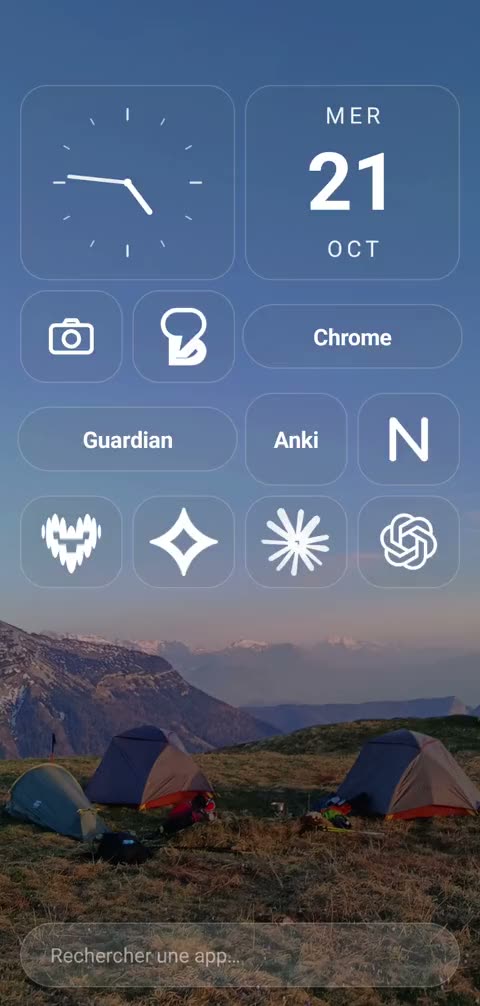
Home screen
No more icons tapped on reflex.
To open an app, you type its name. Two letters are enough, and the urge has time to pass.
Livetime replaces your Android phone's home screen to help you focus and get more done. Less scrolling, more time for what matters.
Made for artists, athletes, the ambitious. For anyone who wants to do things, and is tired of having their attention stolen.
“Your app is almost annoying: it works so well I started getting bored. But then it got me doing things.”
Engineering student
“It's crazy… I had nothing to do, so I took up drawing. Thanks so much.”
High school student, 11th grade
−55% screen time from the very first week, with days as low as 18 minutes.
First-year medical student
“I showed your app to my parents and they were crazy about it, especially my dad. He's totally hooked on the right-hand screen.”
Arthur, third-year medical student
“The app is so good. I'm not kidding.”
Alexis, prépa student
“Honestly, it's really great. […] It's very clean, really intuitive, and I think a lot of people are going to love it.”
Noah, engineering student
See all the reviews and messagesFeatures
Livetime isn't one more app. It's your phone's home screen: the first thing you see, and the only door to your apps.
Home screen
To open an app, you type its name. Two letters are enough, and the urge has time to pass.
Addictive apps
Before you open Instagram or TikTok, Livetime asks how many minutes you want to spend there. When the time is up, the app closes and reminds you what you had planned to do. You can also set a daily time goal for each app.
Instagram custom
Livetime opens Instagram in a lighter view. You keep your friends, your messages and your stories, and you choose what to remove:
YouTube custom
You come for one video, then you leave. In Livetime's lighter view, you can:
Modes
In Sleep, Focus or Sport mode, your home screen keeps only the apps for the moment. You schedule the ones that come back: Sleep can start on its own at 10 pm. And you choose the difficulty:
One hour less a day adds up to fifteen whole days a year.
Results
We're measuring how every user's screen time actually changes, before and after Livetime. The study is under way, and the first results are very promising.
What the phone damages
Our phones are designed to capture our attention. And that time has to come from somewhere.
What the research says
Nearly 800 people. Those who had left their phone in another room did better on memory and reasoning tests than those who had it on the desk, even switched off.
Ward, Duke, Gneezy and Bos, Journal of the Association for Consumer Research, 2017Students limited to 10 minutes a day on Facebook, Instagram and Snapchat felt markedly less lonely and less depressed three weeks later.
Hunt, Marx, Lipson and Young, Journal of Social and Clinical Psychology, 2018619 people: a week without a smartphone, one hour less a day, or no change. Cutting one hour improved well-being and lifestyle, and the effect held up better than quitting entirely, four months later.
Brailovskaia et al., Journal of Experimental Psychology: Applied, 2023Why Livetime exists
When you take up sport, the first thing you change is what you eat: you don't fill your fridge with Nutella and Coke. It's the same with your phone. You don't keep every app that sucks you in on your home screen: you change your home screen. It's simply logical, and that's why Livetime exists.





You don't need more willpower. You need a phone on your side.
Questions
No. Livetime is only available on Android, on Google Play: the iPhone doesn't let you replace its home screen with another app's.
Livetime opens Instagram and YouTube in a lighter view, where you choose to hide the Reels button, the Shorts button, suggested posts and videos, the feed or thumbnails. You keep your friends, your messages and the videos you're looking for.
The app closes and Livetime reminds you what you had planned to do. Depending on the limit you chose, you can add time as often as you like (Soft), up to 15 minutes a day (Flexible), or never (Rigid).